
How to Build an Admin Dashboard for a Taxi Business
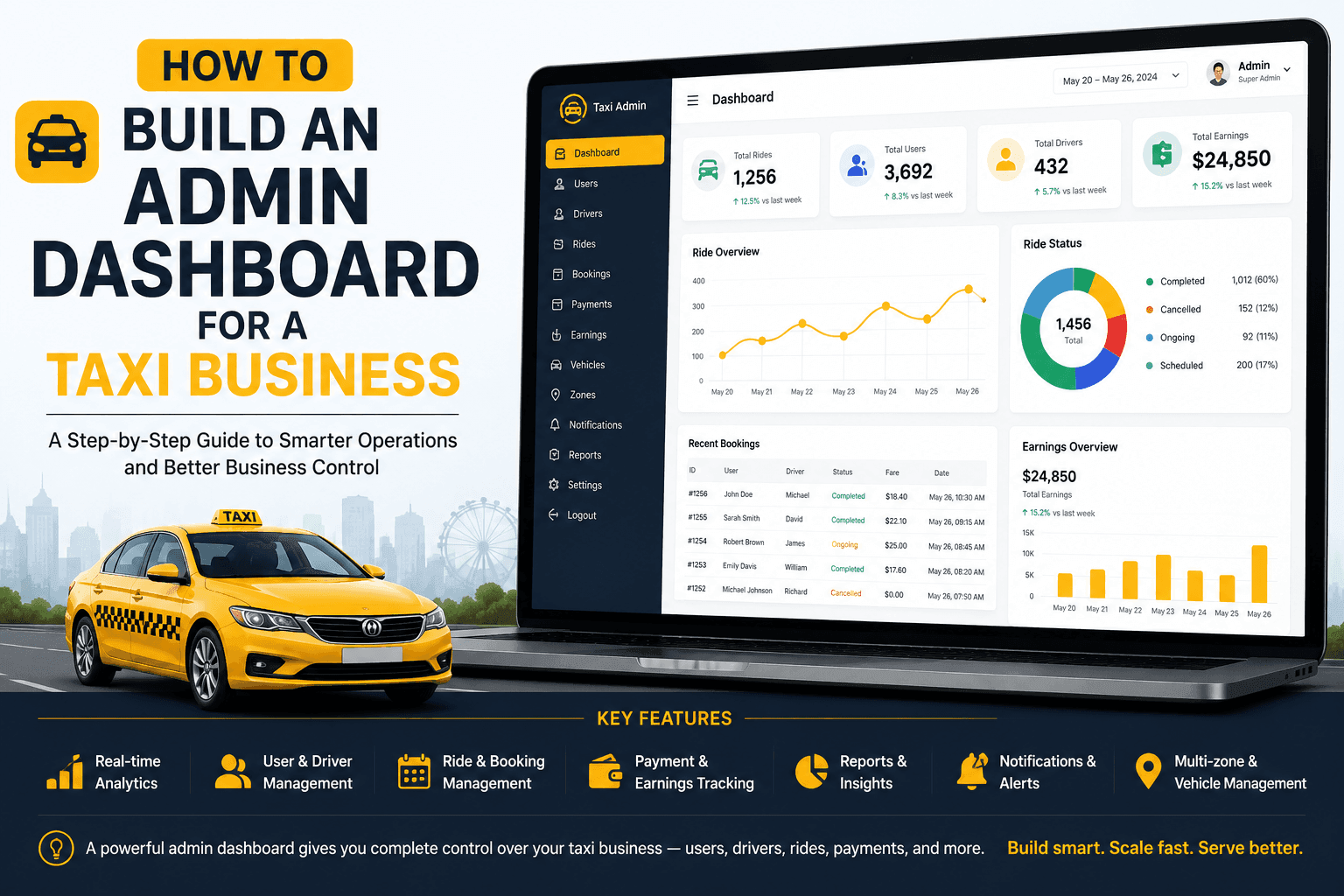
Every taxi platform — whether it's a five-car local fleet or a multi-city ride-hailing brand — lives or dies by one piece of software most passengers never see: the admin dashboard. It's the control room where dispatch decisions, pricing changes, driver approvals, and revenue reporting all happen in real time.
Get it wrong, and you'll be running a taxi business blind — chasing driver disputes over WhatsApp, reconciling payments in spreadsheets, and reacting to problems instead of preventing them. Get it right, and the dashboard becomes your single largest lever for margin, safety, and scale.
This guide breaks down exactly how to build one: the architecture, the must-have modules, the tech stack decisions that actually matter, realistic costs, and the mistakes that quietly kill taxi platforms after launch. If you're evaluating taxi app development services, this is the framework to vet vendors against.
What Is a Taxi Business Admin Dashboard?
A taxi business admin dashboard is the centralized web console that lets fleet owners, dispatchers, and operations teams manage every moving part of a taxi or ride-hailing platform — drivers, vehicles, bookings, pricing, payments, and analytics — from one interface.
Think of it as the operating system for the business side of your app. The rider app and driver app are the storefront; the admin dashboard is the back office that keeps that storefront running profitably.
Featured snippet answer: An admin dashboard for a taxi business is a centralized web-based system that gives fleet operators real-time control over drivers, vehicles, bookings, pricing, payments, and reporting, replacing manual dispatch and spreadsheet-based operations.
Why the Admin Panel Matters More Than the Rider App
Founders often over-invest in the rider app's UI and treat the admin panel as an afterthought. That's backward. Here's why:
- It's where revenue decisions happen. Commission structures, surge pricing, promo budgets — all configured here.
- It's your fraud and safety layer. Fake bookings, GPS spoofing, and driver document fraud are caught (or missed) at the admin level.
- It's what investors and franchise partners actually audit. Due diligence conversations center on reporting accuracy and operational control, not button colors in the rider app.
- It determines how fast you can scale to new cities. A dashboard built with hardcoded zones and flat pricing logic will require a rebuild the moment you expand.
A weak admin panel doesn't just create friction. It silently caps how big the business can get.
Core Modules Every Admin Dashboard Needs
Based on current best practice across established taxi and ride-hailing platforms, a production-ready admin dashboard should include the following modules.
1. Dashboard Overview / Command Center
A live snapshot: active rides on a map, online drivers, today's bookings, revenue-to-date, and pending approvals — the first screen an operator sees.
2. Driver & Vehicle Management
Onboarding workflow: license, insurance, vehicle registration document uploads
Approval/rejection queue with audit trail
Vehicle categorization (economy, premium, XL, etc.)
Suspension and blacklist controls
Document expiry alerts (insurance/license renewal reminders)
3. Rider/User Management
Profile and ride history view
Suspend or ban accounts for fraud or abuse
Support ticket linkage per user
4. Live Ride Monitoring & Dispatch
Real-time map with all active trips, idle drivers, and demand hotspots
Manual dispatch override for VIP bookings, corporate accounts, or system failures
SOS/panic alert monitoring — non-negotiable in 2026, as several markets now require an auditable safety-incident trail
5. Fare & Zone Management
Base fare, per-km, per-minute, and surge multiplier configuration
Geofenced service zones (airport zones, city limits, surge zones)
Multi-city / multi-currency support for scaling operators
6. Payments, Commission & Payout Management
Transaction reconciliation across cash, card, and wallet payments
Automated driver payout scheduling
Commission rate configuration per driver tier or vehicle type
Refund and dispute handling
7. Promotions & Loyalty Management
Coupon and referral program creation
Budget caps and expiry rules
Segment-based targeting (new users, lapsed users, high-frequency riders)
8. Analytics & Reporting
Revenue, trip volume, driver utilization, cancellation rate, average rating
Exportable reports for finance and investor reporting
Cohort and retention views for growth decisions
9. Support & Dispute Resolution
Ticketing system tied to trip IDs
Chat/call log access for dispute investigation
SLA tracking for support response times
10. Roles, Permissions & Multi-Admin Access
Essential the moment you have more than one operator — city managers should see only their zone; finance should see payments, not driver documents.
| Module | Primary User | Business Impact |
|---|---|---|
| Live Dispatch | Operations Team | Reduces cancellations and improves ETA accuracy |
| Fare & Zone Management | Business Owner / Revenue Operations | Optimizes pricing, margins, and market competitiveness |
| Payments & Payouts | Finance Team | Prevents reconciliation errors and strengthens driver trust |
| Analytics & Reporting | Leadership / Investors | Supports data-driven decisions, expansion, and fundraising |
| Roles & Permissions | IT / Security Team | Minimizes internal fraud and protects sensitive business data |
Step-by-Step: How to Build the Dashboard
- Map your operational workflows first, not your screens. Document exactly how a booking moves from request to driver assignment to completion to payout to dispute, before wireframing anything.
- Define your data model. Rides, drivers, vehicles, zones, transactions, and users need clean, normalized relationships.
- Design role-based access control (RBAC) from day one. Retrofitting permissions after launch is expensive and risky.
- Build the real-time layer. Live ride tracking and dispatch require WebSockets or a pub/sub architecture (Socket.IO, Firebase Realtime Database, or Pusher).
- Integrate core third-party services. Maps/routing (Google Maps or Mapbox), payment gateways (Stripe, Razorpay, regional processors), SMS/push (Twilio, Firebase Cloud Messaging).
- Build reporting on a separate read layer. Use a reporting replica or data warehouse (BigQuery, Redshift) once volume grows.
- Test under real dispatch load, not just UI QA. Simulate concurrent bookings, surge conditions, and driver disconnects before go-live.
- Launch with a single-city pilot, then generalize the zone/pricing logic once real-world edge cases surface.
Choosing the Right Tech Stack
There's no universally "best" stack — the right choice depends on team expertise, scale target, and timeline. Current market patterns for taxi admin dashboards look like this:
- Frontend: React.js or Angular for the admin web panel (React is more common for real-time, map-heavy UIs)
- Backend: Node.js or Django/Python for the API layer; Node.js pairs naturally with WebSocket-based live tracking
- Database: PostgreSQL or MySQL for relational data; Redis for caching and real-time state
- Real-time layer: Socket.IO, Firebase Realtime Database, or a managed pub/sub service
- Maps & routing: Google Maps Platform or Mapbox
- Mobile apps: Flutter or React Native for cost-efficient cross-platform coverage; native Swift/Kotlin only where performance or deep OS integration (e.g., CarPlay/Android Auto) justifies it
- Cloud infrastructure: AWS or GCP, with autoscaling for surge periods
- Monitoring: Datadog or New Relic — dispatch downtime has an immediate, visible revenue cost
Custom Build vs. White-Label Solution
This is the first strategic decision, and it should be made before any development starts.
| Factor | Custom Build | White-Label Platform |
|---|---|---|
| Time to Launch | 4–7 months | 3–6 weeks |
| Upfront Cost | Higher | Lower |
| IP Ownership | Full ownership | Limited / License-based |
| Customization | Unlimited flexibility | Limited by the vendor's roadmap |
| Best For | Funded startups with multi-city expansion plans | Local operators validating demand and launching quickly |
Expert take: White-label is a reasonable way to validate demand in a single market fast. But the moment your pricing logic, driver incentive structure, or expansion plan diverges from the vendor's template, you'll hit a ceiling. Many operators start white-label and migrate to a custom-built platform once they've proven the model — plan for that migration path from day one.
Cost to Build a Taxi Admin Dashboard
Costs vary widely by region, feature scope, and whether the dashboard is built alongside rider/driver apps or as a standalone project.
- MVP admin panel (core dispatch, driver management, basic reporting): typically $8,000–$20,000
- Mid-scale dashboard (multi-zone pricing, payments, analytics, roles): typically $25,000–$60,000
- Enterprise-grade platform (multi-city, multi-currency, advanced fraud detection, BI integration): $70,000+
These figures reflect the admin panel specifically — a full platform including rider and driver apps will run higher. Get a scoped quote based on your actual workflow map rather than a generic feature checklist; this is exactly what a specialized taxi app development company should walk you through line by line, not bundle into a flat package price.
Security & Compliance Considerations
- PCI-DSS compliance for any payment data your dashboard touches directly
- Role-based access control with audit logging on every sensitive action (fare changes, refunds, account bans)
- Encrypted data in transit and at rest, especially for driver identity documents
- Regional data residency rules — increasingly relevant as more jurisdictions regulate ride-hailing data storage
- API rate limiting and abuse detection to prevent scraping of driver locations or pricing logic
- Two-factor authentication for all admin accounts, non-negotiable for finance and super-admin roles
Common Mistakes to Avoid
- Hardcoding pricing and zone logic. Works for one city, breaks the moment you expand.
- Treating analytics as an afterthought. Retrofitting reporting after launch means rebuilding your data model.
- Skipping role-based permissions early. One shared admin login across a growing team is a security and accountability liability.
- Underestimating real-time infrastructure needs. Simple page-refresh polling won't hold up under live dispatch load.
- No SOS/incident audit trail. Beyond the safety risk, several markets now expect this for regulatory compliance.
- Choosing a vendor based on rider app screenshots alone. Ask specifically to see admin panel demos and reporting exports.
Industry Trends Shaping Admin Panels in 2026
- AI-based ride matching and demand forecasting are moving from "nice to have" to standard, reducing wait times and improving driver allocation efficiency.
- Automated fraud detection on bookings and payouts is increasingly built into admin panels rather than handled manually by ops teams.
- Voice-based booking and dispatch commands are starting to appear in premium platforms, extending accessibility.
- Unified multi-service dashboards — taxi, courier, and on-demand delivery managed from one admin panel — are becoming common as operators diversify revenue streams.
- Deeper driver-facing transparency tools (clear earnings breakdowns, in-app communication without exposing phone numbers) are now expected baseline features.
Conclusion
The admin dashboard is not a supporting feature of a taxi platform — it's the operational core the entire business runs on. Founders who treat it as a checklist item usually end up rebuilding it within 18 months of launch, once real dispatch volume exposes the gaps in hardcoded pricing, missing permissions, or reporting that doesn't scale.
Whether you're building from scratch or evaluating a white-label starting point, the questions in this guide — data model design, real-time architecture, role-based access, and analytics infrastructure — are exactly what separate a dashboard that scales from one that gets replaced.
Ready to Build a Taxi Admin Dashboard That Scales With You?
If you're planning a new taxi platform or need to rebuild a dashboard that's hit its limits, our team designs and ships production-grade admin panels — live dispatch, multi-zone pricing, payments, and analytics — built to expand into new cities without a rewrite. Talk to our team about your taxi app development in usa requirements and get a scoped cost and timeline based on your actual operational workflow, not a generic package.