
WebAR vs Native AR App: Which Should You Build?
Picture this: you spend six months and a healthy budget building a stunning AR app. Launch day comes, and almost nobody downloads it. The experience is great. The problem is that people never got to it.
Now picture the opposite. You launch a quick browser-based AR campaign, it goes viral, and then your users ask for features the browser simply can’t deliver.
Both mistakes happen all the time, and both come from the same question asked too late: WebAR or native app? If you’re evaluating an AR development service for your brand, this is the first decision to get right, because it shapes your budget, your timeline, and how many customers ever see your experience.
This guide gives you a straight answer, without the vendor bias.
What’s the Real Difference Between WebAR and a Native AR App?
At the simplest level, the difference is where the experience lives.
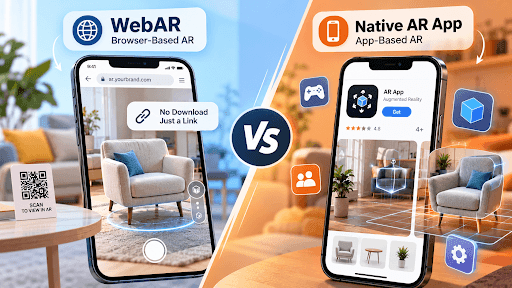
WebAR (Browser-Based AR)
WebAR runs inside a mobile browser like Chrome or Safari. Users scan a QR code or tap a link, and the AR experience opens instantly. There’s nothing to install.
Native AR (App-Based AR)
App-based AR runs on native mobile apps built with ARKit for iOS or ARCore for Android. Users download the app from the App Store or Google Play before they can use it.
Side-by-Side Comparison
| Factor | WebAR | Native AR App |
|---|---|---|
| Access | Click a link or scan a QR code | Download from an app store |
| Friction | Very low | High (installation, storage, sign-up) |
| Performance | Good and improving rapidly | Best, with full hardware access |
| Advanced Tracking | Limited | Advanced SLAM, room mapping, persistent anchors |
| Cross-Platform | One build for iOS and Android | Usually separate or cross-platform builds |
| Time to Launch | Weeks | Months |
| Cost | Lower | Higher upfront and ongoing costs |
| Updates | Instant, no approval needed | App store review required |
| Repeat Engagement | Weaker (no home-screen icon, limited push notifications) | Strong (push notifications, saved data, offline use) |
| Best For | Campaigns, eCommerce, packaging, events | Games, training, enterprise tools, daily-use apps |
Why Does This Choice Matter So Much Right Now?
Because AR has moved from “cool experiment” to “revenue driver,” and picking the wrong format can quietly kill your ROI.
The money is real. North America held 54.10% of the global augmented reality market in 2025, and the market is projected to grow from USD 142.67 billion in 2026 onward. For US businesses, that means your competitors are already investing.
The conversion impact is real too:
- Products with 3D or AR content convert 94% higher than those without, according to Shopify data.
- Home Depot found its AR-enabled products converted 2 to 3 times higher than products without AR.
- Retailers using virtual try-on report up to 40% lower return rates.
And the tech gap is shrinking. WebXR is now stable in Chrome, Edge, and Samsung Internet, with growing Safari support, and WebAssembly has closed most of the performance gap with native AR.
So the question isn’t whether AR pays off. It’s which format lets your customers actually reach it.
When Is WebAR the Smarter Bet?
WebAR wins when reach and speed matter more than depth. Think of it as AR for the moment of decision: a shopper on a product page, a guest at an event, a customer holding your packaging.
Choose WebAR if you need:
- Fast product visualization: “View in your room” for furniture, décor, or appliances
- Virtual try-on: glasses, makeup, watches, sneakers
- Marketing campaigns: QR codes on billboards, print ads, or retail displays
- Interactive packaging: scan the box, watch the product come alive
- Trade shows and events: no one wants to download an app at a booth
- A low-risk pilot: proving AR’s value before a bigger investment
Why it works
The biggest enemy of conversion is friction. Requiring an app download for AR breaks the sales funnel, while WebAR’s click-and-view experience keeps customers in the buying flow. Every extra tap loses people, and an app install is a lot of taps.
Where WebAR falls short
Be honest about its limits. WebAR still trails native apps on advanced SLAM, robust face tracking, and deep integration with device functions. If your idea depends on those, keep reading.
Practical tip: iPhone users matter enormously in the US market, and iOS browser AR has historically lagged Android. Always test your WebAR experience on real iPhones (not just simulators) before launch.
When Does a Native AR App Earn Its Higher Price?
A native app makes sense when users will come back again and again, or when the experience needs power the browser can’t provide.
Choose a native AR app if you need:
- Complex, high-fidelity 3D: detailed models, realistic lighting, physics
- Room-scale or persistent AR: persistent anchors and room-scale mapping are still better served by native AR
- AR games: advanced AR games need precise spatial tracking and high-fidelity graphics, which makes native the better fit
- Enterprise training and field service: technicians using AR repair guides daily
- Healthcare and medical visualization: precision matters
- Offline use: warehouses, job sites, remote locations
- Loyalty and repeat engagement: push notifications, saved progress, user accounts
The trade-off
You get power, but you pay for it in time, budget, and user effort. Native apps need more investment and longer build cycles, which is why WebAR is often the smarter entry point for startups or teams testing an MVP.
How Much Does Each Option Cost, and How Long Does It Take?
This is usually the question behind the question. Here are typical ranges for US projects. Your actual numbers depend on scope, 3D asset needs, and integrations.
| Project Type | WebAR (Est.) | Native AR App (Est.) | Typical Timeline |
|---|---|---|---|
| Simple Product Viewer / Marker-Based AR | $5K–$20K | $30K+ | 2–6 Weeks vs. 2–4 Months |
| Virtual Try-On / eCommerce Integration | $20K–$60K | $60K–$150K | 1–3 Months vs. 4–6 Months |
| Gamified or Branded Campaign | $15K–$50K | $50K–$120K | 4–8 Weeks vs. 3–5 Months |
| Enterprise Training / Complex 3D | Often Not Ideal | $100K–$300K+ | — vs. 6–12 Months |
For reference, a basic native AR app with marker tracking, a simple 3D overlay, and minimal interactions typically starts at around $30,000.
Hidden costs people forget
- 3D asset creation: often 20–40% of the total budget
- App store maintenance: OS updates break things; native apps need ongoing fixes
- User acquisition: a native app needs marketing just to get downloads
- Analytics setup: without tracking, you can’t prove ROI
Is There a Middle Path Between WebAR and Native?
Yes, and it’s often the smartest move. Many successful brands use a hybrid AR strategy:
- Start with WebAR to reach the widest audience and collect real usage data.
- Measure engagement, dwell time, and AR-to-purchase conversion.
- Graduate to native only for the features and users that prove they need it.
This lets real customer behavior make the decision, instead of guesswork. It also means the 3D assets you build for WebAR can usually be reused later in a native app, so your first investment isn’t wasted.
How Do You Decide? A 5-Question Framework
Answer these honestly, and the choice usually becomes obvious.
1. How often will people use it?
- Once or occasionally → WebAR
- Daily or weekly → Native
2. Where does the user discover it?
- Product page, ad, packaging, QR code → WebAR
- Existing app or internal tool → Native
3. How complex is the experience?
- Viewing, placing, or trying on products → WebAR
- Room mapping, multiplayer, heavy physics → Native
4. What’s your timeline and budget?
- Need results this quarter, limited budget → WebAR
- Long-term product investment → Native
5. What does success look like?
- Conversions, reach, campaign buzz → WebAR
- Retention, productivity, recurring usage → Native
Scoring: Mostly WebAR answers? Start in the browser. Mostly native? Build the app. A mix? The hybrid path is probably your best fit.
What Should You Look For in an AR Development Partner?
Whichever format you choose, the team behind it matters more than the technology. A good AR development company won’t push you toward the most expensive option. It will push you toward the option that pays off.
Questions to ask before you hire
- Do they build both WebAR and native? A team that only does one will recommend that one.
- Can they show live work you can test on your own phone? Demos beat slide decks.
- Do they handle 3D asset creation in-house? Outsourcing assets slows projects and hurts quality.
- Do they plan for analytics from day one? You should know what success looks like before you build.
- Do they understand your market? Choosing an experienced team for AR development USA projects means they understand American shopping behavior, iOS-heavy audiences, and accessibility expectations.
Red flags
- A fixed price before they’ve understood your goals
- No questions about your audience or sales funnel
- Promises of “app-quality” results in the browser for every use case
At TechReforms, our process starts with exactly this conversation: what you’re trying to achieve, who your users are, and where they’ll meet your AR experience. Sometimes that leads to a two-week WebAR pilot. Sometimes it leads to a full native app. Often it’s a hybrid roadmap. The goal is the same either way: an experience people actually use, and results you can measure.
The Bottom Line
There’s no universal winner, only the right fit for your goal.
- WebAR is your best choice for reach, speed, and conversions.
- Native AR is your best choice for power, depth, and repeat engagement.
- Hybrid is your best choice when you want to start fast and scale smart.
Still unsure which path fits your project? A short strategy call with an experienced AR development agency can save you months of building the wrong thing. Talk to TechReforms about your idea, and we’ll help you map the right approach, with a realistic budget and timeline, before you spend a dollar on development.
Frequently Asked
Questions
Retail, furniture, beauty, real estate, automotive, education, healthcare, and manufacturing see strong results. Retail and eCommerce lean toward WebAR, while training, healthcare, and field service usually benefit from native apps.