





SERVICE
NLP & TEXT INTELLIGENCE

NLP & Text Intelligence:Sentiment, Entity Extraction & Semantic Search

Natural Language Processing turns unstructured text — reviews, tickets, contracts, transcripts — into structured data your systems can act on. We build sentiment models, entity extractors, classifiers, and semantic search on top of your text data, not a generic sentiment API.

See AI Development Services
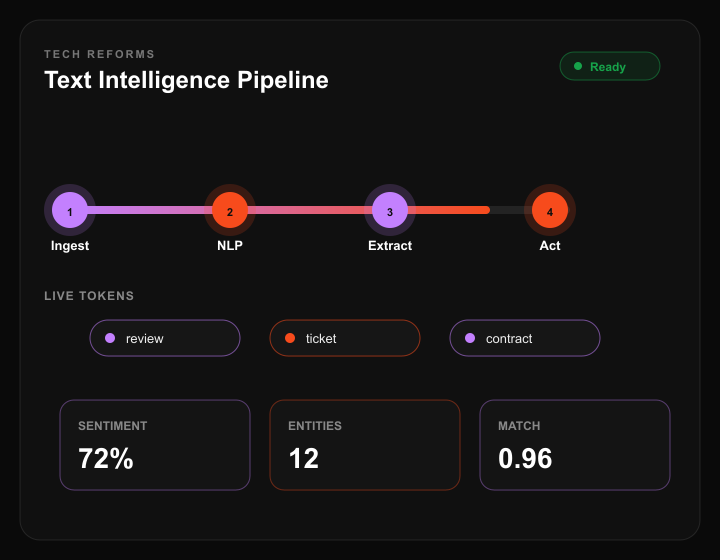
Text intelligence pipeline: ingest, NLP, extract, and act
KEY
STATS
Tech Reforms logo accent for Core NLP impact statDecorative hover highlight for Core NLP
4
Core NLP
Capability areas
Tech Reforms logo accent for Weeks impact statDecorative hover highlight for Weeks
3–8
Weeks
Use-case dependent
Tech Reforms logo accent for Typical cost impact statDecorative hover highlight for Typical cost
$6K–30K
Typical cost
Range by use case
Tech Reforms logo accent for AI systems impact statDecorative hover highlight for AI systems
40+
AI systems
Shipped by our team
DEFINITION

What Is NLP & Text Intelligence?

Natural Language Processing (NLP) is the field of AI focused on extracting structured meaning from unstructured text — sentiment analysis, named entity recognition, document categorization, and semantic search across large corpora.

Classical models (fast, cheap, fixed taxonomy) and LLM-based approaches (flexible, higher cost) both have a place. The right choice depends on latency, privacy, and how often your label set changes.

Semantic search is closely related to RAG pipelines — both use embeddings to retrieve relevant text by meaning. NLP classification and entity extraction often sit in front of or alongside a RAG system.

CAPABILITIES

Four Core NLP Capabilities

Each extracts a different kind of structure from raw text, with a different data requirement and accuracy benchmark.

Sentiment Analysis01

Classify tone & polarity in text

Scores reviews, support tickets, or social mentions as positive, negative, or neutral — often with an intensity score, not just a label.

Best for

Reviews, support, social listening

Data need

Labeled examples per domain

Entity Extraction02

Pull structured fields from free text

Identifies names, dates, amounts, product codes, or custom entity types from contracts, emails, or transcripts.

Best for

Legal, finance, ops automation

Data need

Annotated entity examples

Document Classification03

Sort documents into categories automatically

Routes tickets, emails, or filings to the right queue or category without manual triage.

Best for

Support routing, compliance sorting

Data need

Labeled examples per category

Semantic Search04

Find conceptually related text, not just keyword matches

Retrieves relevant results based on meaning — a search for "cancel my plan" also surfaces docs about "subscription termination."

Best for

Knowledge bases, internal search

Data need

Existing document corpus

COST

NLP Cost by Use Case

Estimates assume a reasonable volume of representative text data is available. Add cost for large-scale manual labeling if starting from zero.

Sentiment analysis

Timeline

3–4 weeks

Cost

$6K–12K

Entity extraction

Timeline

4–6 weeks

Cost

$10K–20K

Document classification

Timeline

3–5 weeks

Cost

$8K–16K

Semantic search across a large corpus

Timeline

4–8 weeks

Cost

$12K–30K

PROCESS

How We Build an NLP System

A clear path from data audit to production monitoring — so every engagement ships with a defined taxonomy, a held-out benchmark, and a deployment plan.

01

Data Audit

Review existing text volume, quality, and any prior labeling to determine whether a classical model or LLM-based approach fits the accuracy and cost target.

02

Labeling & Taxonomy Design

Define categories or entity types precisely — ambiguous taxonomy is the most common cause of low classification accuracy downstream.

03

Model Selection & Build

Classical model, fine-tuned LLM, or prompted LLM — chosen per capability, not a single default across the whole system.

04

Evaluation Against Benchmark

Precision/recall on a held-out labeled set before launch, following the same evaluation-first standard across all our AI work.

05

Deployment & Monitoring

Production deployment with accuracy monitoring — see our MLOps checklist for what's tracked post-launch.

DECISION
FRAMEWORK

Classical NLP vs. LLM-Based NLP

Use a Classical Model if

Volume is high and the task is narrow

Sentiment scoring on millions of reviews with a fixed category set — a small trained classifier is far cheaper per call than an LLM prompt.

Use an LLM if

Categories shift or need nuance

Ticket routing where new categories appear regularly, or extraction that needs contextual judgment — an LLM adapts without retraining.

Use a Classical Model if

Latency and per-call cost are critical

Real-time filtering at scale favors a lightweight trained model over an LLM call on every item.

Use an LLM if

You need semantic search, not keyword matching

Concept-level retrieval requires embeddings from a language model — this is the same mechanism behind RAG.

Soft gradient background behind testimonials
Decorative background for testimonial content
OUR
TESTIMONIALS
Our Work
Speaks For Us

Elena Vargas

Head of Support, B2B SaaS

They mapped our messy ticket taxonomy before recommending a model — intent routing hit 92% on a holdout set and cut triage time in half.

James Okonkwo

Compliance Lead, Fintech

Entity extraction on contracts shipped with clear precision/recall targets and an on-prem path. First team that treated PII as a design constraint, not an afterthought.

Decorative graphic in 3D text rotation section
Dark textured background behind contact form
Contact
Us
Partner with Us for
Custom AI Development
and AI That Actually Ships
Phone handset icon for contact call-to-action
Call us at:
(582) 233-5015
YourBenefits
LLM & RAG Integration
Custom ML Models
AI Agents & Automation
HIPAA & SOC 2-Aligned Builds
Full IP Ownership
Post-Launch Model Monitoring

Book a free AI strategy call — we'll tell you honestly if AI is the right fit before we quote anything.

Schedule a free consultation

No sales pitch on the first call — just a feasibility read on your use case.

What happens
next?
Process step one illustration
We Schedule a call at your convenience
Process step two illustration
We do a discovery and consulting meeting
Process step three illustration
We prepare a proposal
FAQ

Frequently Asked
Questions

Common business uses include sentiment analysis on reviews and support tickets, entity extraction from contracts and forms, automated document classification and routing, and semantic search across internal knowledge bases.
Sentiment analysis classifies the emotional tone of text (positive, negative, neutral). Entity extraction identifies and pulls out specific structured information — names, dates, amounts — regardless of tone.
Semantic search is the retrieval component that RAG systems use. RAG adds a generation step on top — after retrieving relevant text via semantic search, an LLM uses it as context to generate an answer.
$6K–12K for sentiment analysis, $8K–16K for document classification, $10K–20K for entity extraction, and $12K–30K for semantic search across a large document corpus. Cost scales with data volume and labeling needs.