
Custom ERP Software Development Process: From Planning to Deployment
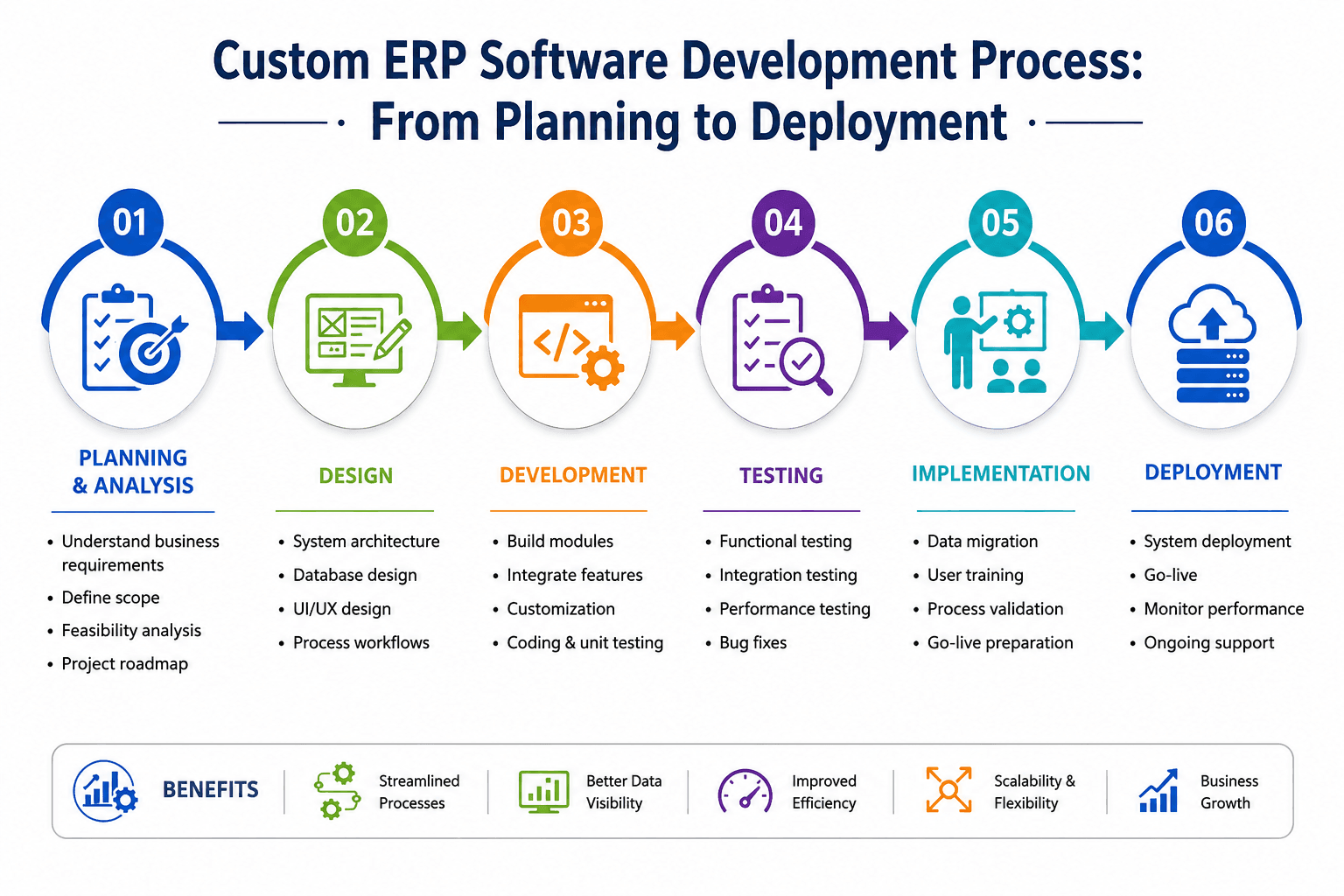
To develop an ERP system that genuinely aligns with your business requirements, begin with comprehensive planning and requirements gathering. The Project Management Institute emphasizes that "the success of an ERP project depends more on the quality of the planning and requirements gathering phase than on the coding itself." Neglecting this essential step can lead to the downfall of even the most well-funded projects.
The aim is to achieve absolute clarity by documenting inefficiencies, redundancies, and essential integration points across all departments.
A structured discovery phase includes these four key activities:
- Audit existing systems and manual processes to identify bottlenecks, redundant data entry, and processes that rely on spreadsheets or email.
- Define the scope of core modules: set clear boundaries for CRM, Inventory Management, and HRMS, ensuring team alignment on deliverables, particularly where CRM and ERP integration will maximize efficiency.
- Map cross-departmental data flows: track how data moves between finance, operations, and HR to avoid integration issues later.
- Establish measurable KPIs: set success metrics like reduced order-processing times or decreased invoice errors before development starts, using proven ERP implementation frameworks.
Once requirements are defined and data flows are mapped, the next step is translating this blueprint into a scalable architecture and a user-friendly interface.
Design the Modular Architecture and UI/UX
With requirements solidified, the next step is to convert them into a scalable technical blueprint. Quality ERP software development services distinguish systems that thrive under growth from those that fail. According to Orases, the architectural decisions made here influence how well the system adapts to future demands — with Gartner research confirming that custom ERPs outperform standard alternatives through modular scalability and targeted legacy integration.
Four design priorities guide this phase:
| Component | Design Priority |
|---|---|
| Tech Stack | Flexible modular system for scalable modules |
| Data Structure | Optimized for high-volume inventory and CRM data queries |
| UI/UX Wireframes | User-friendly interfaces that are easy for non-technical staff to use |
| System Connections | API-first design for seamless connections to existing third-party tools |
User adoption is a critical factor in ERP success. Test wireframes with actual end-users early to identify potential issues before development begins. A modular approach allows teams to build and validate each component individually, significantly reducing deployment risks.
With the architecture defined, the foundation is set for the development phase, where modules are assembled, integrated, and tested with real data.
Execute Iterative Development, Integration, and Go-Live
With a robust architectural plan, the development phase begins. How you manage this phase determines whether your ERP delivers value promptly or suffers costly delays. Iterative, sprint-based development keeps teams focused and allows early adjustments. Partnering with experienced ERP implementation services ensures each sprint delivers tested, production-ready solutions. For businesses exploring how AI and automation are reshaping this process, our guide on the future of ERP software development services covers what to expect next.
Follow this proven development sequence:
- Build the core ERP engine first: establish primary data structures, secure login systems, and system connections that all modules will rely on.
- Develop specialized modules incrementally: prioritize high-impact modules like Workforce Resource Management (WRM), finance, and inventory before secondary features.
- Implement CRM and ERP integration: synchronize sales pipelines with operational data for real-time forecasting, order management, and customer records.
- Run continuous code reviews and automated unit testing: per Dynatech Consultancy, automated testing at each sprint checkpoint reduces regression risk before deployment.
The stakes are high: the global ERP market is projected to reach $123.41 billion by 2030, growing at an 11.1% CAGR. This underscores the importance of getting implementation right. Once development is stable, the system is ready for rigorous quality assurance and deployment.
Perform Rigorous QA, User Acceptance Testing, and Deployment
Testing is where the custom ERP development process proves its real-world value. According to Panorama Consulting Solutions, 95% of businesses report significant improvements after ERP implementation, heavily reliant on thorough pre-launch testing.
A structured QA phase should cover these checkpoints:
- End-to-end module testing: Validate workflows like inventory management and financial reporting under realistic conditions to catch errors early.
- User Acceptance Testing (UAT): Include department heads in testing sessions to uncover edge cases no developer anticipates. Consider partnering with a specialized ERP development partner for structured UAT cycles.
- Stress and load testing: Simulate peak traffic scenarios, such as month-end closes or bulk order processing, to ensure system stability under pressure.
- Feedback-driven UI refinement: Address any user-identified issues that affect daily workflows.
Success metric: Achieve a UAT sign-off rate above 90% across all core modules before go-live.
Rushing this phase to meet a launch deadline often leads to increased post-deployment support costs. A thorough testing cycle ensures long-term system performance and smooth operation.
Go-Live & Deployment
Once testing is complete, it's time for the Go-Live and Deployment phase. This is where the system transitions from the testing environment to the live environment. Ensure that all users are prepared and trained, and have a support team ready to handle any issues that arise during the initial launch period.
Key activities during this phase include:
- Final data migration: Ensure all data is transferred accurately to the new system.
- Go-live checklist: Verify all components are functioning correctly.
- Post-launch support: Provide immediate assistance to users during the transition phase.
Cost Breakdown
Understanding the costs associated with ERP implementation is crucial for budgeting. Here's a breakdown of typical costs for different business sizes:
- Small Business: $10,000 - $50,000
- Mid-Size Business: $50,000 - $500,000
- Enterprise: $500,000 - $1,000,000+
These figures can vary based on customization, number of users, and specific business needs.
Still unsure whether a custom ERP is worth the investment for your business size? Our in-depth breakdown of custom software development vs off-the-shelf software will help you make the right decision before committing to a budget.
How to Ensure Long-Term ERP Success and Scalability
Building a custom ERP is a significant achievement, but maintaining its value requires strategic planning. From a well-structured inventory management ERP system to automated HR workflows, every module needs a clear growth, maintenance, and adoption path.
Focus on these priorities to protect your investment:
- Emphasize modularity. Design your system to accommodate new features without disrupting operations. A modular architecture allows for incremental capability expansion as business needs change.
- Invest in staff training. Technology delivers ROI only when used effectively. Structured onboarding and role-specific training increase adoption and reduce workarounds.
- Schedule proactive maintenance. Regularly update security patches, dependencies, and data backups. According to Godlan, ongoing support planning is crucial for long-term ERP success.
- Partner with a specialized agency. Build flexible, scalable enterprise tools — including custom WRM and HRMS platforms — with team-scaling support that evolves with your digital transformation.
Long-term ERP success requires active management. Start by reviewing your current roadmap, identify which module your team needs next, and connect with an enterprise development partner who can help you build and sustain systems that grow with your business goals.